B.S. INFORMATION TECHNOLOGY STUDENT
ABHASH
I build responsive, high-performance web applications and design modern user interfaces.
View My WorkCode. Build. Deploy. Repeat.
Portfolio Items
Design
During my two-week internship at Harbor Software Co., Ltd.
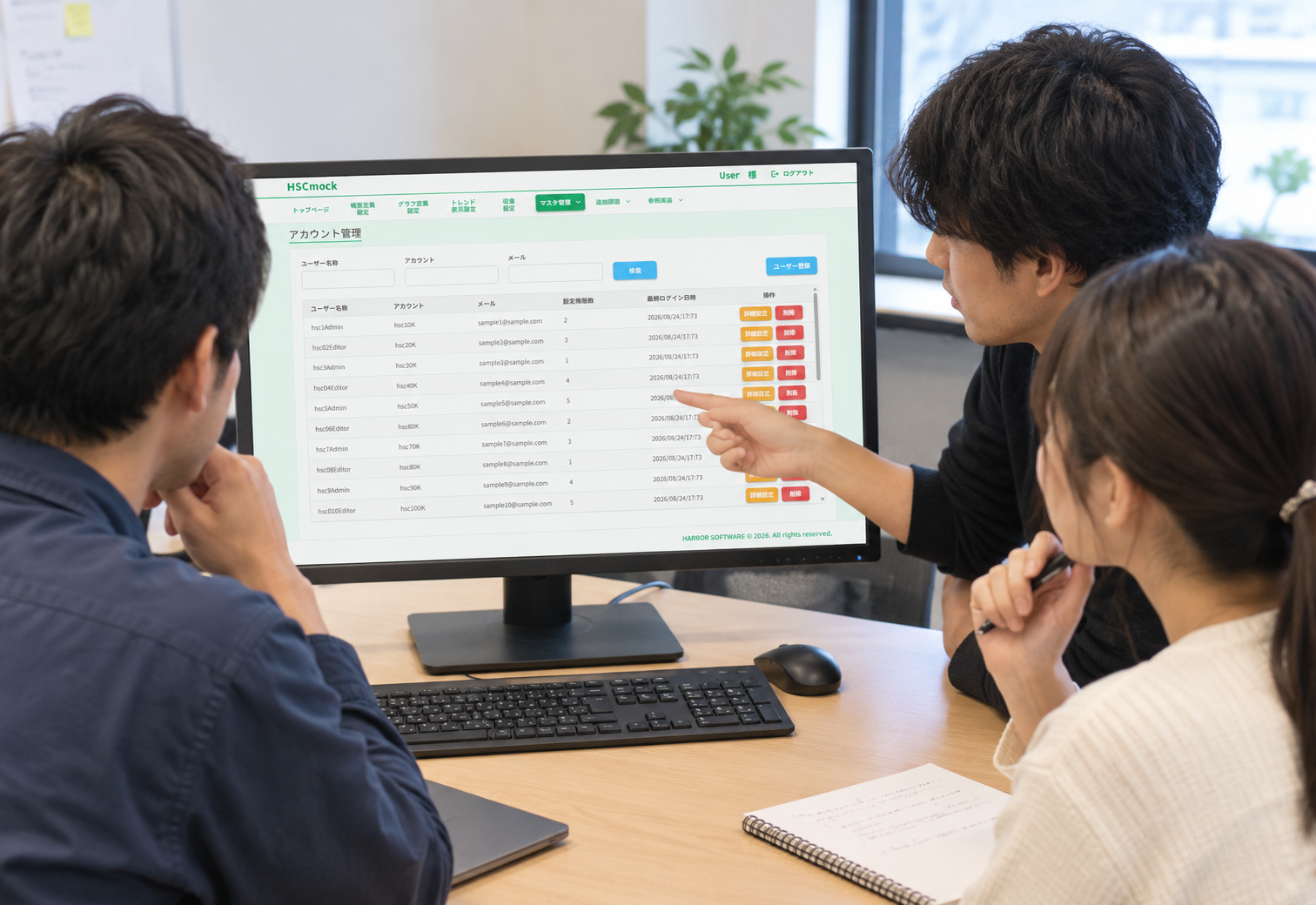
Internship ProjectHSCmock Frontend UI DevelopmentHarbor Software Co., Ltd. | InternshipOverviewDuring my two-week internship at Harbor Software Co., Ltd., I worked on the frontend UI development of HSCmock, a system designed to handle equipment operation data.My main responsibility was to create mockup screens for system users. I developed the UI while checking requirements and specifications and considered the screen structure, input fields, and user interaction flow.Project PeriodAugust 17 – August 28, 2026RoleFrontend Developer / UI DevelopmentMy main responsibilities included:Frontend UI developmentScreen layout design and implementationCreating definition filesReviewing requirements and specificationsResponding to UI review feedbackImplementing additional featuresDiscussing specifications and implementation methods with team membersTechnologiesNext.jsReactTypeScriptNode.jsMUIVisual Studio CodeHTML / CSSNext.js, TypeScript, and React were new technologies for me. Through this internship, I learned how to use them in an actual development environment while building frontend screens.Developed Screens01. Account Management ScreenI developed an account management screen for managing users who use the system.The list screen allows users to search by information such as username, account, and email address. The detail screen allows registered information to be modified.I focused on creating a clear layout and organizing input fields so that users could operate the screen without confusion.02. Master PLC Management ScreenI developed a screen for registering master PLCs associated with equipment and configuring which tags should be associated with imported values.I carefully reviewed the requirements and implemented the rule that a maximum of 10 tags can be displayed.I also adjusted the layout width to prevent the screen from breaking and maintain a consistent UI.03. Register / Tag Mapping ScreenI developed a screen for managing the relationship between registers and tags.For parts that were not specifically described in the provided materials, I considered how the UI should work and designed the interface accordingly.To reduce input mistakes, I used dropdown menus wherever appropriate.04. Trend Display ScreenI also worked on a trend display screen for viewing equipment data.I adjusted the UI according to the requirements, including restrictions on the number of items that can be displayed.05. Other ScreensIn addition to the screens above, I also worked on:Specification-related screensTerminal management screensSite management screensProblem SolvingDuring development, I encountered situations where some requirements could not be implemented using the existing system structure.Instead of simply accepting that something could not be done, I discussed the problems with the person in charge and other team members and worked on improving the shared implementation structure.Problems I SolvedSearch Input Error HandlingThere was an issue in the event-log period search where the table disappeared when an invalid input was entered.I helped solve this problem by adding a common mechanism to notify users when an input error occurred.Adding Execution Button TypesI added different execution button types according to the requirements of the screens.List Item Limit ValidationI implemented a mechanism to check the maximum number of items that could be displayed in a list.This mechanism was also useful for a graph screen developed by another team member.Review & ImprovementThe screens I created were reviewed by the internship supervisor.Based on the feedback I received, I made the necessary corrections and improvements.Through this review process, I learned that frontend development is not simply about completing a screen. It involves a continuous process of:Understanding requirements → Implementation → Review → ImprovementThis gave me practical experience with an actual development workflow.ChallengeOne challenge I encountered was updating the list screen after information had been modified on the detail screen.I could not complete this functionality because there was no available guide explaining how to implement this part using the existing system structure.This experience taught me the importance of identifying what information is missing, asking questions, and discussing technical problems with other team members rather than trying to solve everything alone.What I Learned1. Understanding the Gap Between Requirements and ImplementationI learned that there can sometimes be a difference between what is written in the requirements and what can actually be implemented using the existing system.Understanding this gap and finding an appropriate implementation approach is an important part of software development.2. Team DevelopmentOne of the mechanisms I developed was also used by another team member’s screen.This helped me understand that the code I write can contribute not only to my own work but also to the development of the entire team.3. Importance of Code ReviewThrough reviews, I was able to discover improvements that I might not have noticed by myself.I learned the value of receiving feedback and continuously improving my implementation.4. Working with New TechnologiesNext.js, TypeScript, and React were new technologies for me.During the internship, I learned how to use these technologies in a real development environment and successfully created frontend screens.My GrowthThis internship gave me valuable experience that I could not gain through school learning alone.In particular, I developed practical experience in:Understanding requirementsDesigning and implementing UIIdentifying and solving problemsCommunicating and collaborating with team membersI learned that software development is not only about writing code. It also requires understanding requirements, communicating with others, responding to feedback, and improving the solution.Internship OutcomeThis internship was a valuable opportunity for me to experience frontend development in an actual development environment.I experienced the complete process of understanding requirements, checking specifications, implementing screens, receiving reviews, discussing problems with team members, and improving the implementation.Through this experience, I gained a better understanding of frontend development and team-based software development.I will continue improving my skills in Next.js, TypeScript, React, and modern web development, and apply what I learned from this internship to future projects.
Web
After completing a 5-day work experience at AY Tech Co., Ltd.
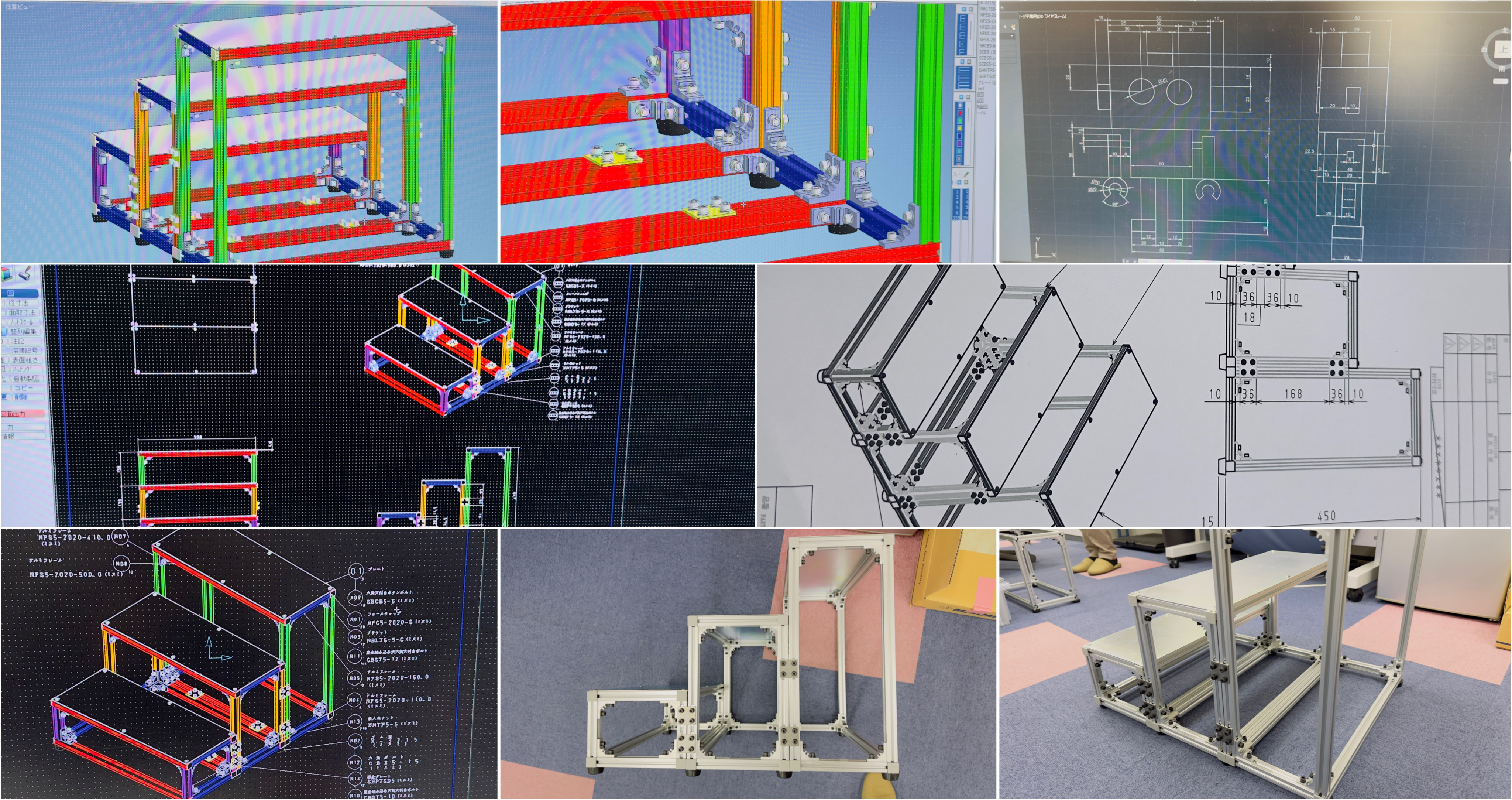
Hello, I'm Abhash.I had the opportunity to participate in a five-day workplace training (Internship) at AYTEC Co., Ltd. from March 2nd to March 5th, Reiwa 7 (2025). It was five days filled with invaluable experiences that I couldn't have gained through school classes alone. This time, I'd like to reflect on those experiences and summarize them in this blog post.What kind of company is AYTEC?AYTEC, established in 1992, is a company with 65 employees that handles mechanical and electrical design. Its head office is in Okayama, with additional bases in Osaka and Vietnam. As the term "monozukuri" (manufacturing/craftsmanship) suggests, I felt they are truly unsung heroes, supporting Japanese industry from behind the scenes.Three things I experienced during the trainingDuring this training, I had the opportunity to experience three main things.1. Creating drawings using CAD (Day 1 & Day 2)First, after receiving an explanation about the company, I worked on creating drawings using two software programs: AutoCAD and ICAD. I practiced drawing in 2D while looking at 3D drawings, and conversely, creating 3D models from 2D drawings, which made me realize the depth of the design world.2. Dimension measurement and parts verification (Day 3)On the third day, I actually measured the dimensions of a designed staircase and performed sorting and verification of its parts. I learned that there's a process of physically holding and checking items, not just looking at drawings, which helped me understand how design and manufacturing are connected.3. Assembling the staircase (Day 4 & Day 5)Then, on the fourth and fifth days, I took on the challenge of actually assembling the staircase. To see something I was involved in designing actually take shape—this experience was truly moving. The moment lines in a drawing transformed into a three-dimensional object before my eyes was the most memorable part of these five days.What I became able to do through the trainingThrough this training, I was able to acquire basic operations of AutoCAD. An even bigger lesson I learned was the importance of proactively asking questions when you don't understand something. And I was able to practically learn the fundamentals essential for working adults: "Hou-Ren-Sou" (Report, Liaise, Consult).Challenges I observed and my future goalsOf course, there were things that didn't go well. It took time to understand AutoCAD operations and specialized terminology, and there were times I struggled to create accurate drawings.Therefore, during the training, I made sure to actively ask questions whenever I didn't understand something. Going forward, I plan to continuously practice CAD to improve both speed and accuracy.In conclusionI learned so many things in these five days that I wouldn't have gained in a year of school. I would like to express my sincere gratitude to everyone at AYTEC for their kind guidance.I hope to use this experience as a stepping stone and continue to grow, one step at a time. Thank you for reading to the end.
Mobile
QR POS system for restaurants
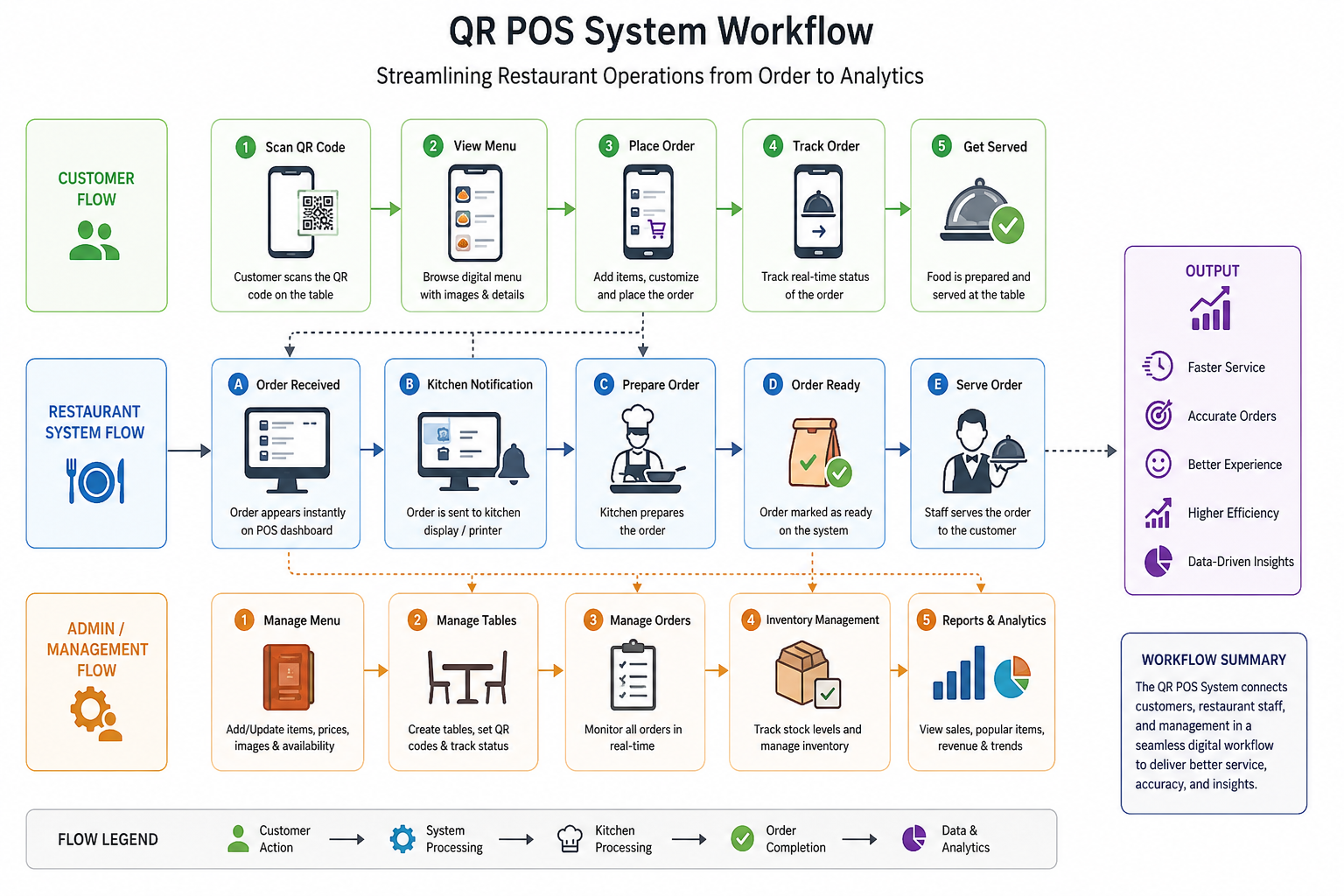
The restaurant industry is rapidly embracing digital solutions to improve customer experience and streamline daily operations. Traditional paper menus, manual order taking, and inefficient billing processes often lead to longer waiting times, order mistakes, and unnecessary operational costs.To address these challenges, I developed a QR POS (Point of Sale) System—a modern restaurant management platform that combines contactless digital ordering with an intuitive POS dashboard. The project also includes a professionally designed landing page that showcases the product, highlights its features, and helps attract potential customers.Project OverviewThe QR POS System is designed to simplify restaurant operations by allowing customers to browse menus, place orders, and interact with the restaurant directly through a QR code. Restaurant staff can manage orders, menus, tables, and sales from a centralized dashboard, making the entire workflow faster and more efficient.The accompanying landing page serves as the product’s online presence, introducing visitors to the platform, explaining its benefits, and encouraging restaurant owners to adopt the solution.
Building the digital future.
B.S. Information Technology student with a passion for building robust web applications and intuitive user interfaces.
My journey started with building simple static sites, and today I work with advanced frameworks like Next.js, React, and Node.js.
When I'm not coding, I'm exploring new technologies, contributing to open-source projects, and constantly learning.
3.8
GPA
4+
Projects
3
Certs
My Philosophy
"First, solve the problem. Then, write the code."
— John Johnson
Bytes & Thoughts
Blog Posts
OCT 10, 2025
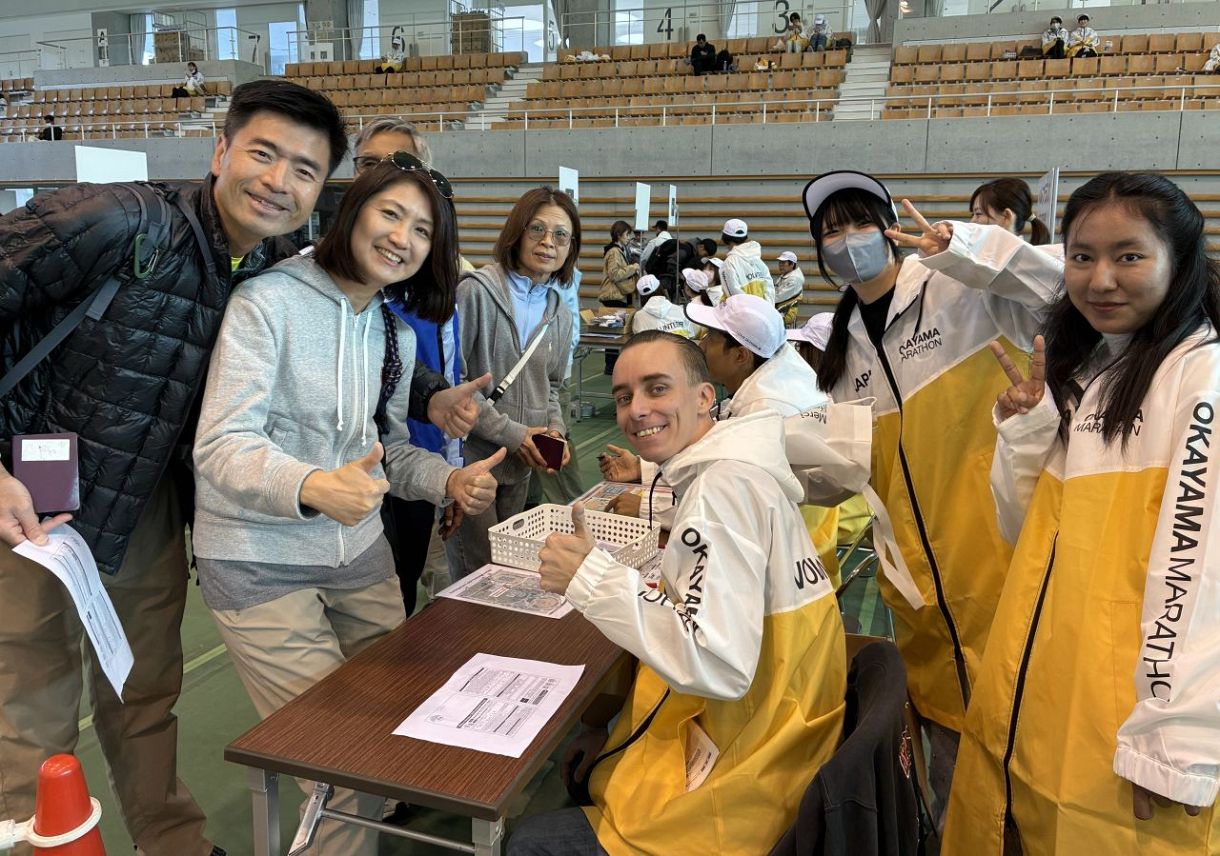
Okayama Marathon 2025! I participated as a volunteer.
The service at "Reception Counter 1 (Overseas Counter)" left an impression on me.

JUL 13, 2026
The Future of IT Jobs in the Age of AI
IT jobs will not disappear in the AI era. Instead, technological advancements are further expanding the market's demand for IT.